Friday, 30 July 2010

LibraryThing

LibraryThing looks fun! It was easy to sign up to and adding books is very easy. I like the the way it links the books you upload with similar books. It gives a way of accessing other books that you might not otherwise come across. So if you're in the mood for a good Dick Francis book and you've read all he's written, add one of his titles to your library and see what pops up in your recommended section and you could discover a new author that you love as much as Dick!

I have to say that adding my whole book collection is unlikely to happen, unless I suddenly become housebound! I have a life somewhere else and I don't have the time to go through the books I own, once owned, have ever read. However, if you don't mind not having your full collection of books catalogued online, I think it would be achievable to add titles as you come across them from this point forward and be able to create a good reference point in the future for your self about the books you've read. It's definitely a long-term project.

One way I would like to use LT would be as an aide-memoire. If I like an author, I tend to try and read all their books, but sometimes cannot remember which titles I've read. Some authors, like the aforementioned Dick, basically write the same book time and again, with a slightly different story angle and title and it's easy to forget which you've read over the years. A list on LT would keep everything straight, and you wouldn't lose the list just when you need it!

As some libraries are using LT to create catalogues of their books, I presume it is a good way of advertising their holdings.

Friday, 9 July 2010

A Welcome Break

Phew, I for one am glad of a learning pause. For some of us there has been a lot of new information to take on board. When I signed up I thought, yes an hour or so a week, I can fit that in. But in practice I think it takes a lot longer than an hour a week to come to grips with and start to understand the basics of what each Thing offers. There have been a few quick Things that have been either easy to do, or that I have already used and therefore don't require the same level of time to get to know. It has been difficult to keep up with reading other blogs. I tend to be an all or nothing type of person - I either want to know it all, or nothing. I either read all the blogs or none. Hopefully the blogs will be archived so that people can catch up with reading them after the course has finished. Some blogs are informative with hints and tips, recommendations etc, others are funny and others make you realize you aren't the only one struggling. Also, I've been really grateful for the help I've had with some of the Things through the comments sections. BTW, does anyone know if it's possible to follow comments and how to do that?

And to cover some of the questions:
Yes, my skills and knowledge have definitely improved. If on a scale of 1-10, I was a 1 or 2 when I started, I think I'm probably a 6 or 7 now. My toes have definitely dipped in and I will continue to wade in upto my knees, and as 23 Things often leads on to several other Things, I'm sure that I'll eventually get wet upto my middle! So, considering my competence wasn't great as I'd never tried the majority of the Things, I guess I must say that I do feel more competent, and also more confident in going on to try both the Things and other things that lead on from them. It is also nice to give my self permission to actually use my time to do the Things, because I've found that the whole programme does eat time, whether through exploring the new Things myself or reading others' blogs about their Things.  I have tried recommending Things to other people, but they tend to fall into two categories - 1. They already know about it; 2. They know nothing about it, and are not interested in finding out more!

I hope to be able to apply what I've learnt about the Things as my department explores having its own Facebook page and considers whether to set up a blog. I will use Doodle again when I have to organize meetings, and I'm regularly using my Google calendar again.

I took the VARK questionnaire and although I would say I learn quickest from watching someone else do the thing I'm trying to learn, according to VARK I learn best through reading/writing. So I guess the activities have suited my learning style - plenty of reading and then some doing.

I am glad that I am taking part in 23 Things. It has made me more aware of the different opportunities out there, and as we, as a Library as a whole, and as departments individually, are making more use of these technologies I feel that I am in with a chance of keeping up or even being ahead of the changes.

Here's to the next 10 Things!


Friday, 2 July 2010

Thank you, that was Delicious

How lucky am I. Another Thing that I have not looked into before. Something new to learn and explore. So, an account has been opened and bookmarks uploaded. Now to experiment. The proof in the pudding, as they say, will be in the eating.

My question is, do I now always have to have a Delicious page open on my browser to access my bookmarks?

At the moment, it seems quicker to me to just click on the bookmarks folder on my browser bar and then click on the bookmark I want to access. Having to go into Delicious, seems like adding in an extra step to get to the bookmarks. Maybe when I know more about Delicious, it'll make more sense.

On the whole, though, I think it is a good idea to have bookmarks stored in a central place and accessible from any computer whether at home, or work or in the local library even if I don't use Delicious every time I access a bookmark. And I think it will come into its own either when I get a new computer and want to access the bookmarks that were on the old machine, or when my computer crashes and has to be wiped clean so that all data not on the server is lost, as has happened in the past.

Slideshare

Wow, Slideshare is a little goldmine of information!

I'm not one to be giving powerpoint or such presentations, but it sure is interesting to read through some of the other presentations. One by Phil Bradley on 25 Things to entertain .... is like an additional 25 things to the 23 we are doing. It's all about useful Web 2.0 technologies. I will definitely have a look at more of his presentations on Web 2.0 and will follow his blog.

I guess Slideshare is useful for those who give a lot of presentations. It's somewhere to store them for future reference, and if you need a presentation on-the-go then it's always available online.

For me though, I think this resource is another place to pick up expert information which people have been kind enough to share.

Successful photo importing

Hooray! I have inserted a photo into my blog and it is all thanks to Girl in the Moon. Many thanks for the instructions. It would have taken me a very, very long time to stumble across that sequence of clicks, although I did find that I did not need to go into the IE, as Flickr gave me the link under the photo. Thanks for info about updating the editor too. It is definitely much easier to use. If you're not updated I definitely recommend it.


Tuesday, 29 June 2010

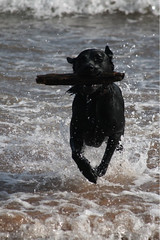
Sea, sand, stick = happy dog

This is my attempt to add a photo from Flickr to my blog. It was supposed to be in another post, but I only managed to get it into its own indvidiual post. It just takes time to figure these things out. Time which I don't have right now. Ideally I would have liked the text to the left of this photos, but I can't figure out how to change it.
Sea, sand, stick = happy dog

Flikr/Flickr

Time for another spot of blogging.

Last week's Thing was to look at and use Flikr which was fun. I had heard mention of Flickr but hadn't looked it at all before last week. It was lovely to see all the photos of the Library in Sir Cam and Idlethink. As the Library is a no go place for children, I took the opportunity to show my son where I work. He managed to tear his eyes away from the the PS3 game for brief seconds as a cycled through my favourites and said he'd look properly later. He hasn't!

I, however, did enjoy seeing the Library afresh from new perspectives. I would never have thought that canteen chairs could look so special. When we get our staff tearoom makeover we will only have the photos as reminders. Maybe we should decorate the walls with a poster size print?

Learning about CreativeCommons was also interesting. It is good to know that if you use and credit the photo you will not break any copyright.

I also opened an account and uploaded one photo just to see how it works, and as I do not need to worry about the copyright, I can embed (or is it upload) it here:

Ok, so that didn't work. Let's try now:

OK, copying and pasting the url isn't working, but I have managed to import it into it's own bog entry.

This thing leads from one thing to another and before you know it an hour plus has gone by. I feel like I'm following a trail of breadcrumbs through the forest, turning round and feeling lost!

However, despite not being able to immediately get a photo into this post, I do like Flikr, I mean Flickr (I can never spell this word right first time!). I like looking at the photos, discovering what's out there, and will use it to share photos. It's also good to know of an alternative source of images from Google Images.